
Using Claude Code + MCP to Automate My Web App Development Workflow
Over the past few weeks, I’ve been experimenting with a lightweight agentic development workflow using Claude Code and a simple MCP (Model Context Protocol) integration. The goal wasn’t to “replace” engineering — it was to remove friction from the parts of development that slow momentum: ticket writing, branch setup, boilerplate coding, PR creation, and Jira hygiene.
What I ended up with is a simple, repeatable flow that feels natural, stays human-in-the-loop, and dramatically speeds up delivery for a web application I’m building for myself.
This post walks through exactly how it works.
Note: Claude Code is currently only available on the Claude Pro plan ($20/month or $17/month if paid annually). You’ll need Claude Pro in order to implement this workflow.
High-Level Workflow
At a glance, the process looks like this:
-
Create or refine a Jira story
-
Move the story to In Progress
-
Run /start <story #> in Claude
-
Claude:
-
Creates GitHub branches
-
Implements the solution
-
Updates Jira
-
Opens a PR with testing instructions
-
-
I test and review
-
If needed, updates are made
-
Merge → Move story to Done → Repeat
It’s simple, structured, and predictable.
1. Setup
First:
-
Get Claude Pro (if you don’t already have it).
-
Make sure Claude Code is installed and working locally. Documentation can be found here:
https://code.claude.com/docs/en/overview
-
Download Claude for Desktop. I’ve found the desktop app makes adding MCPs and connectors significantly easier than managing everything purely through the terminal.
2. Connecting Claude to Jira via MCP
Inside the Claude desktop app:
-
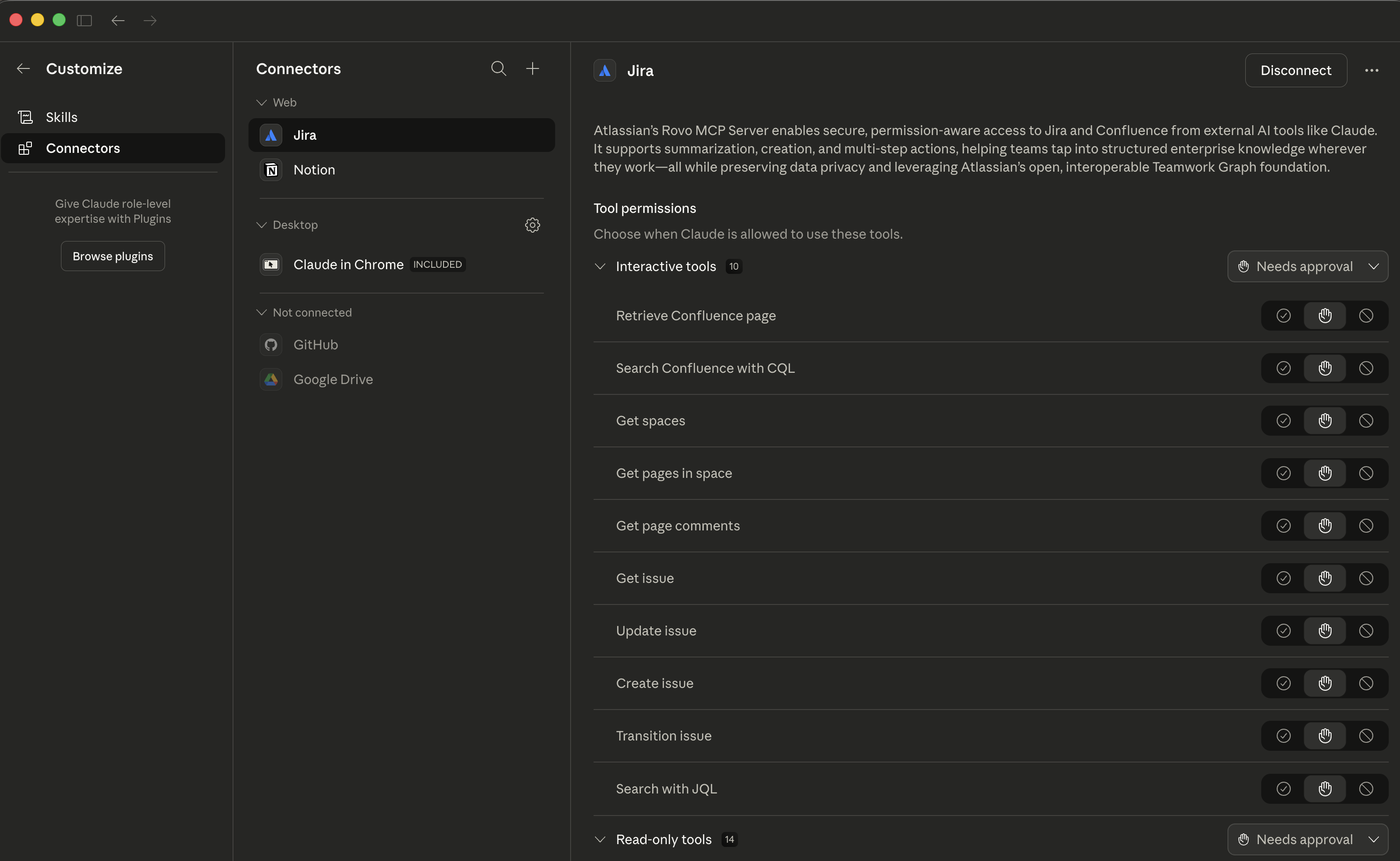
Go to Settings → Connectors
-
Search for Jira
-
Click Connect
This walks you through authentication via Jira’s website. The process is straightforward. Personally, I prefer this approach over wiring everything up manually in the terminal.
Once connected, Claude can:
-
Read Jira stories
-
Update story status
-
Add comments
-
Modify descriptions
That context is what makes the rest of this flow possible.
Here's what the Claude desktop Settings -> Connector page looks like:
3. A Structured Jira Story Template
One of the biggest improvements came from standardizing how stories are written.
Whether I write the story, expand one, or generate it from a larger epic, the structure stays consistent. That consistency dramatically improves implementation quality.
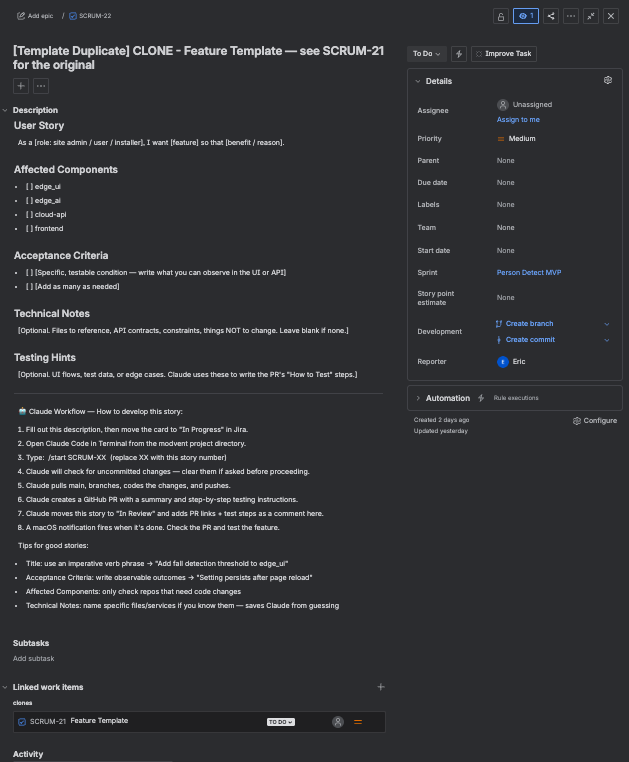
Here’s the template I use:
User Story
As a [role: site admin / user / installer], I want [feature] so that [benefit / reason].
Affected Repos
-
edge_ui
-
edge_ai
-
cloud-api
-
frontend
Acceptance Criteria
-
Specific, testable condition (observable in UI or API)
-
Add as many as needed
Technical Notes
Optional. Reference files, API contracts, constraints, or things that should NOT be changed.
Testing Hints
Optional. UI flows, test data, or edge cases. These are especially helpful when generating PR “How to Test” steps.
Development Workflow
-
Fill out the story.
-
Move it to In Progress in Jira.
-
Open Claude Code from the project root.
-
Run: /start SCRUM-XX (replace with story number).
-
Claude checks for uncommitted changes.
-
Claude pulls main, creates branches, implements changes, and pushes.
-
A GitHub PR is created with summary + step-by-step testing instructions.
-
The Jira story moves to In Review and gets updated with PR links and test steps.
-
A macOS notification fires when everything is done.
Tips for Writing Strong Stories
-
Title: Use an imperative verb phrase
Example: “Add fall detection threshold to edge_ui”
-
Acceptance Criteria: Write observable outcomes
Example: “Setting persists after page reload”
-
Affected Components: Only check repos that require changes
-
Technical Notes: Name specific files/services if known — this prevents guesswork
The structure reduces ambiguity and forces clarity before any code is written.
My Jira template:
Claude Writing Stories vs. Humans Writing Stories
Claude is very good at:
-
Breaking epics into logically scoped stories
-
Identifying missing acceptance criteria
-
Suggesting edge cases
-
Drafting test plans
For larger initiatives, I’ll often ask it to break an epic into properly scoped Jira stories.
That said, human-written stories are still essential.
Humans:
-
Define business intent and priorities
-
Understand nuance and risk
-
Decide what not to build
Claude is strong at structuring and expanding. Humans are strong at direction and judgment. The combination works well.
4. Kicking Off Implementation
Before automating anything, I defined exactly how I wanted the /start command to behave.
Here’s the instruction set I gave it (you can adjust this for your own workflow):
I would like to run /start <jira story number>. When triggered:
- Open a new branch for each repo updated by this feature
- Implement the changes
- Push the branch
- Create a GitHub PR with the Jira story number, summary of changes, and testing instructions
- Move the Jira story from “In Progress” to “In Review”
- Update the Jira story with any missing details and testing instructions
- Attempt to execute as much of the testing instructions as possible
- Notify me when finished with a short summary
Note: You’ll need the GitHub CLI installed to create PRs without using a GitHub connector.
When a story is ready:
-
I move it to In Progress.
-
I run /start <story-number> from the project root.
From there, the process is largely automated — but I monitor and approve commands as they execute. This keeps me fully in control while eliminating repetitive setup work.
5. Automated PR Creation and Jira Updates
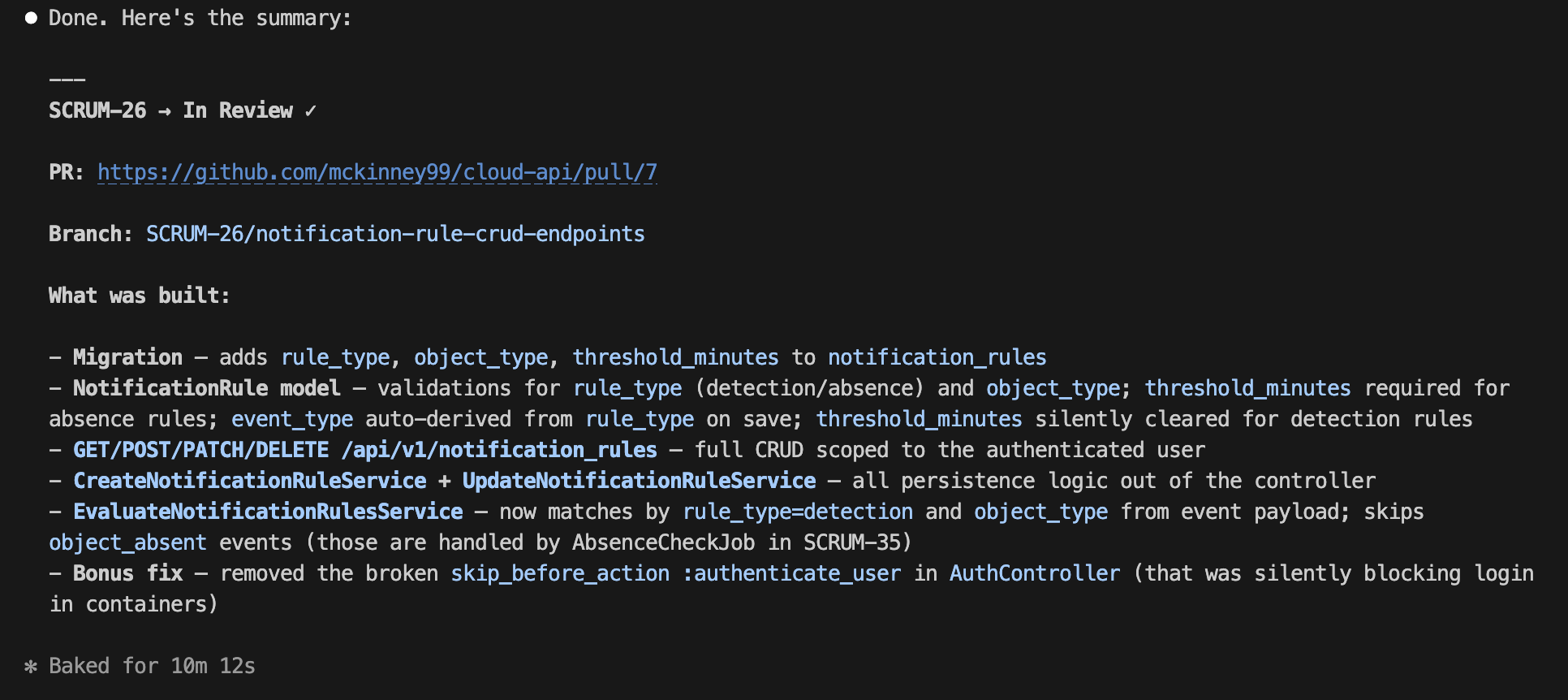
When implementation is complete, the system:
-
Pushes the branch
-
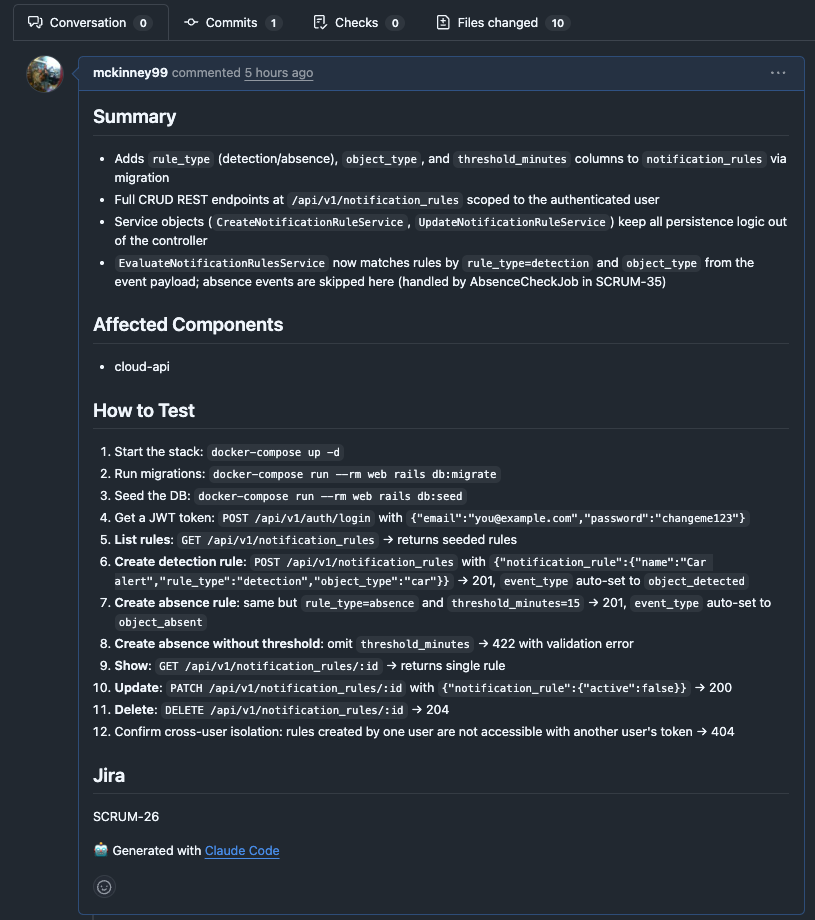
Creates a Pull Request
-
Adds:
-
A short summary
-
Implementation details
-
Clear testing instructions
-
-
Moves the Jira story to In Review
-
Updates the Jira story with:
-
What changed
-
How to test
-
Additional context
-
It also sends a macOS notification when finished.
This removes a surprising amount of cognitive overhead.
Claude code after it's finished:
And the PR it created:
6. Human-in-the-Loop Testing
Once it finishes:
-
I follow the PR testing instructions exactly.
-
If something doesn’t work:
-
I describe the issue.
-
The fix is made in the same branch.
-
I retest.
-
Keeping all changes in the same branch keeps the PR clean and auditable.
Precise feedback leads to fast iteration.
7. Code Review and Feedback
After testing passes:
-
I review the PR.
-
I approve it or request changes.
If changes are needed, I simply instruct it to review the PR comments and address them.
The branch gets updated, commits are pushed, and the PR description is revised if necessary.
It feels similar to pairing with a responsive junior engineer except the turnaround time is measured in seconds.
8. Merge and Repeat
Once everything looks good:
-
Merge into main
-
Move the Jira story to Done
-
Start the next story
That’s the entire loop.
Why This Works
This workflow works because it is:
1. Structured
The Jira template provides clarity.
2. Scoped
Each /start command focuses on one story.
3. Observable
I review and approve what runs.
4. Human-Governed
Execution is automated. Decisions are not.
What Makes This “Agentic” But Practical
There’s a lot of hype around AI agents. This isn’t that.
This is a controlled automation loop:
-
Structured requirements
-
Bounded execution
-
Automated system updates
-
Human review at every stage
It’s simple. It’s repeatable. It’s safe.
For developers new to MCPs or AI-assisted development, this is a low-risk way to start experimenting.
Lessons Learned
1. Story Quality Directly Impacts Code Quality
Garbage in → garbage out still applies.
2. Smaller Stories Produce Better Results
When generating an epic and related Jira stories, I explicitly limit stories to 5 points or less. I also define what a “story point” means in my system since that varies from team to team.
Smaller scope reduces ambiguity and limits drift.
3. Clear Test Instructions Matter
If you can’t clearly describe how to test something, implementation quality will suffer.
4. Don’t Remove Humans From the Loop
Letting agents run autonomously for long stretches often leads to drift, assumptions, and hallucinations. Breaking work into small, reviewable increments actually increases overall velocity because corrections happen earlier and more frequently.
Final Thoughts
This workflow has helped me:
Ship features faster
-
Maintain clean Jira hygiene
-
Reduce repetitive setup tasks
-
Focus more on architecture and validation
-
Stay in control while increasing velocity
It’s not magic. It’s structured delegation.
If you’re experimenting with Claude Code, MCPs, or AI-assisted development, I’d recommend starting with:
-
A strong ticket template
-
Clear swim lanes
-
One bounded command like /start
From there, you can evolve the system over time.
If anyone is interested, I’m happy to share configs, agent instructions, or walk through a demo.
Thanks for reading :)